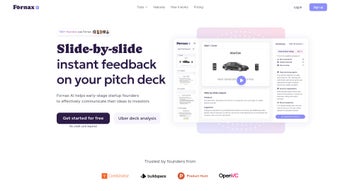

Download Fornax – AI Pitch Deck Feedback Tool for Startups
Overview
Fornax is a browser‑based AI application built for early‑stage startup founders who need rapid, data‑driven feedback on their pitch decks. By simply dragging a PDF onto the homepage, founders receive a slide‑by‑slide analysis that covers narrative clarity, product‑market fit, visual hierarchy, and team presentation. The AI model has been trained on thousands of successful decks and investor notes, allowing it to pinpoint weak spots such as vague problem statements, inconsistent branding, or missing traction metrics.
Because the service runs entirely in the cloud, there is no need for registration, installation, or heavyweight desktop software—just a secure, privacy‑first interface that deletes files from memory once the review is complete. Fornax’s free tier provides unlimited reviews, making it an ideal first‑line tool for bootstrapped founders, accelerator cohorts, and anyone preparing for a seed round, demo day, or internal stakeholder meeting. The platform continuously updates its knowledge base to reflect evolving investor expectations, ensuring that the recommendations stay relevant.
In short, Fornax turns a time‑consuming manual review process into a fast, repeatable, and affordable workflow that can dramatically improve a deck’s chances of resonating with venture capitalists.
Key Features
- Instant Slide‑by‑Slide Feedback: AI evaluates each slide individually, delivering concrete suggestions for messaging, data visualization, and design consistency.
- Product‑Market Fit Scoring: The tool checks for clear articulation of problem, solution, target market, and traction, flagging gaps that could confuse investors.
- Design Optimization: Recommendations include font hierarchy, colour contrast, image placement, and whitespace balance to create a professional look.
- Team Slide Review: AI assesses the clarity of roles, experience relevance, and credibility, offering ways to highlight founder strengths.
- No‑Sign‑Up Required: Users upload a PDF and receive feedback instantly without creating an account, preserving anonymity.
- Cross‑Platform Accessibility: Works on any modern browser across Windows, macOS, Linux, iOS and Android devices.
- Secure Data Handling: Files are processed in memory and automatically deleted after analysis, complying with GDPR and CCPA.
- Exportable Report: After the review, a concise PDF report can be downloaded, ready to share with co‑founders or mentors.
- Continuous Learning Updates: The AI model is refreshed regularly with the latest investor trends and deck best‑practices.
- Free Unlimited Tier: Core feedback engine is completely free, with a premium option for priority processing and deeper industry insights.
Installation, Usage & Compatibility
Getting Started in Seconds
To begin, open the official Fornax website on any up‑to‑date browser (Chrome, Edge, Firefox, or Safari). Click the prominent “Upload Your Pitch Deck” button, then drag your PDF file onto the drop zone or use the file‑picker to select it. As soon as the upload completes, the AI engine starts parsing the document.
Within 30–60 seconds you’ll see a summary dashboard that lists each slide, a confidence score for clarity, design, and market fit, plus a short bullet list of suggested improvements. Clicking a slide thumbnail expands a detailed view that includes before‑and‑after visual mockups where applicable. When you’re satisfied, press “Download Report” to receive a PDF containing all recommendations, ready to be applied in PowerPoint, Keynote, or Google Slides.
Best Practices for Maximum Impact
For optimal results, keep a master copy of your deck untouched so you can compare revisions side‑by‑side. Avoid embedding large video files directly in the PDF; instead, link to external videos to keep parsing fast. Use clear, descriptive slide titles—AI relies on headings to infer context, so titles like “Market Size – TAM/SAM/SOM” improve suggestion relevance.
If you have a narrative outline separate from the slides, upload it as a plain‑text file; Fornax can cross‑reference the outline to ensure story flow matches slide order. After implementing the first round of edits, run the deck through Fornax again to validate that changes were captured and to uncover any new opportunities. This iterative loop mimics professional pitch‑deck coaching and accelerates convergence on a polished final product.
Because Fornax is a cloud‑native web app, it runs on any operating system with a modern browser, including:
- Windows 10/11
- macOS Ventura and earlier
- Linux distributions (Ubuntu, Fedora, Debian)
- iOS 14+ and iPadOS
- Android 9+
Pros, Cons & Frequently Asked Questions
Pros
- Instant AI‑driven feedback reduces revision time.
- Zero registration preserves privacy and speeds up the process.
- Comprehensive analysis of narrative, design, market fit, and team slides.
- Free unlimited reviews make it accessible to bootstrapped startups.
- Cross‑platform support via any modern browser.
- Secure in‑memory processing ensures data is not stored long‑term.
- Exportable PDF report simplifies sharing with investors or mentors.
- Regular model updates keep recommendations current with investor trends.
Cons
- Only PDF uploads are supported; PowerPoint or Keynote files must be exported first.
- AI suggestions are guideline‑based and may not replace nuanced human coaching for complex narratives.
- Large decks (>50 slides) or low‑bandwidth connections can slow processing.
- Industry‑specific language customization is limited in the free tier.
- No built‑in slide editor; users must apply changes manually in their presentation software.
FAQ
Is Fornax truly free?
Yes. The core feedback engine is completely free and allows unlimited PDF uploads. A premium plan exists for faster processing and deeper industry insights, but it is optional.
Can I upload decks that contain confidential information?
All files are processed in memory and automatically deleted after the analysis, meeting GDPR and CCPA standards. No permanent storage occurs.
What file formats does Fornax accept?
Only PDF files are accepted at present. Export your PowerPoint, Keynote, or Google Slides deck as a PDF before uploading.
How does Fornax evaluate product‑market fit?
The AI scans for key elements—problem statement, solution description, target market size, go‑to‑market strategy, and traction metrics—and compares them against a database of successful seed‑stage decks to gauge fit.
Do I need an internet connection to view the feedback?
Yes. Because all processing occurs on Fornax’s servers, an active internet connection is required to upload the PDF and retrieve the AI analysis.
Conclusion & Call to Action
In the ultra‑competitive world of startup fundraising, a polished pitch deck can be the decisive factor between securing capital and watching a great idea stall. Fornax delivers instant, AI‑powered feedback that covers both storytelling and visual design, all within a secure, no‑sign‑up environment. Its free unlimited tier democratizes access to high‑quality deck reviews, allowing founders with limited budgets to iterate rapidly and present a professional narrative to investors. While the tool currently supports only PDF uploads and lacks deep industry‑specific tailoring in the free version, the overall value—speed, security, and breadth of analysis—far outweighs these minor constraints. If you’re ready to accelerate your fundraising timeline, boost investor confidence, and refine your deck without costly consulting fees, download Fornax today and experience the power of AI‑driven pitch deck optimization.
Fornax provides a fast, reliable, and free solution for early‑stage founders seeking to refine their pitch decks. The AI’s slide‑level feedback is granular, and the no‑sign‑up approach respects privacy. Although the free tier lacks deep industry‑specific customization, the overall value dramatically exceeds the minor limitations, making it a must‑have tool for any startup preparing for investor meetings.
Pros
- Immediate AI feedback
- Zero registration required
- Free unlimited reviews
- Cross‑platform accessibility
- Secure, temporary data handling
Cons
- PDF‑only uploads
- No built‑in slide editor
- Limited industry customization in free tier



.png)



